
Hostel management software
A hostel PMS that sells beds, not just rooms
For founders opening a backpacker hostel and operators growing a hostel chain in India. RevNext Cloud PMS sells each dorm bed as its own unit, fills female, male and mixed dorms without mixing them up, and checks in every guest with their ID, a signed copy of the house rules, a deposit and a locker.
Why a hotel PMS falls short
Why can't a hostel run on an ordinary hotel PMS?
A hotel PMS counts rooms. A hostel sells beds: six people who do not know each other share a dorm, each with their own dates, their own bill and their own ID. On a room-based system the usual workarounds are to set up every bed as a fake “room”, or to sell the dorm as one room and keep the beds on a spreadsheet. Both break as soon as a group of four books into a six-bed dorm, a female guest needs a bed in a female-only dorm, or a channel sells the last bed while the desk is moving someone.
Check-in is different too. A hotel usually records the person who booked. A hostel needs every guest: their ID, nationality, the house rules they agreed to, the deposit they paid and the locker they took. Every foreign guest has to be reported on Form III (formerly Form C) within 24 hours of arrival.[2]
RevNext builds this into the same Cloud PMS hotels use, so a property with private rooms and dorms runs on one system.
Compared
A hotel PMS and RevNext, side by side
What a typical room-based hotel PMS does by default, against what RevNext Cloud PMS does for a hostel. Some hotel systems add parts of this; ask your vendor.
A typical hotel PMS
- What it sells
- Rooms. Beds have to be faked as rooms or kept on a spreadsheet.
- GST slab tested on
- The room's tariff
- Who is checked in
- Usually the lead guest
- Foreign guests
- Nationality on the profile
- Housekeeping
- Room status
RevNext Cloud PMS for hostelsOurs
- What it sells
- Beds and rooms, on one property. A dorm can also be booked whole.
- GST slab tested on
- Each bed's own nightly tariff
- Who is checked in
- Every guest, with ID, rules, deposit and keys
- Foreign guests
- Passport and visa, a Form III list with a 24-hour clock, CSV export
- Housekeeping
- Each bed's status, strip-and-make tasks, linen log
| What it sells | GST slab tested on | Who is checked in | Foreign guests | Housekeeping | |
|---|---|---|---|---|---|
| A typical hotel PMS | Rooms. Beds have to be faked as rooms or kept on a spreadsheet. | The room's tariff | Usually the lead guest | Nationality on the profile | Room status |
| RevNext Cloud PMS for hostelsOurs | Beds and rooms, on one property. A dorm can also be booked whole. | Each bed's own nightly tariff | Every guest, with ID, rules, deposit and keys | Passport and visa, a Form III list with a 24-hour clock, CSV export | Each bed's status, strip-and-make tasks, linen log |
On GST: accommodation is taxed at 5% up to Rs 7,500 per unit per day and 18% above it.[1] RevNext picks the slab on each bed's own nightly tariff, so a group of 12 paying Rs 9,600 a night for a dorm of Rs 800 beds is billed per bed. Confirm how this applies to your hostel with your chartered accountant.
The screens
RevNext for hostels, screen by screen
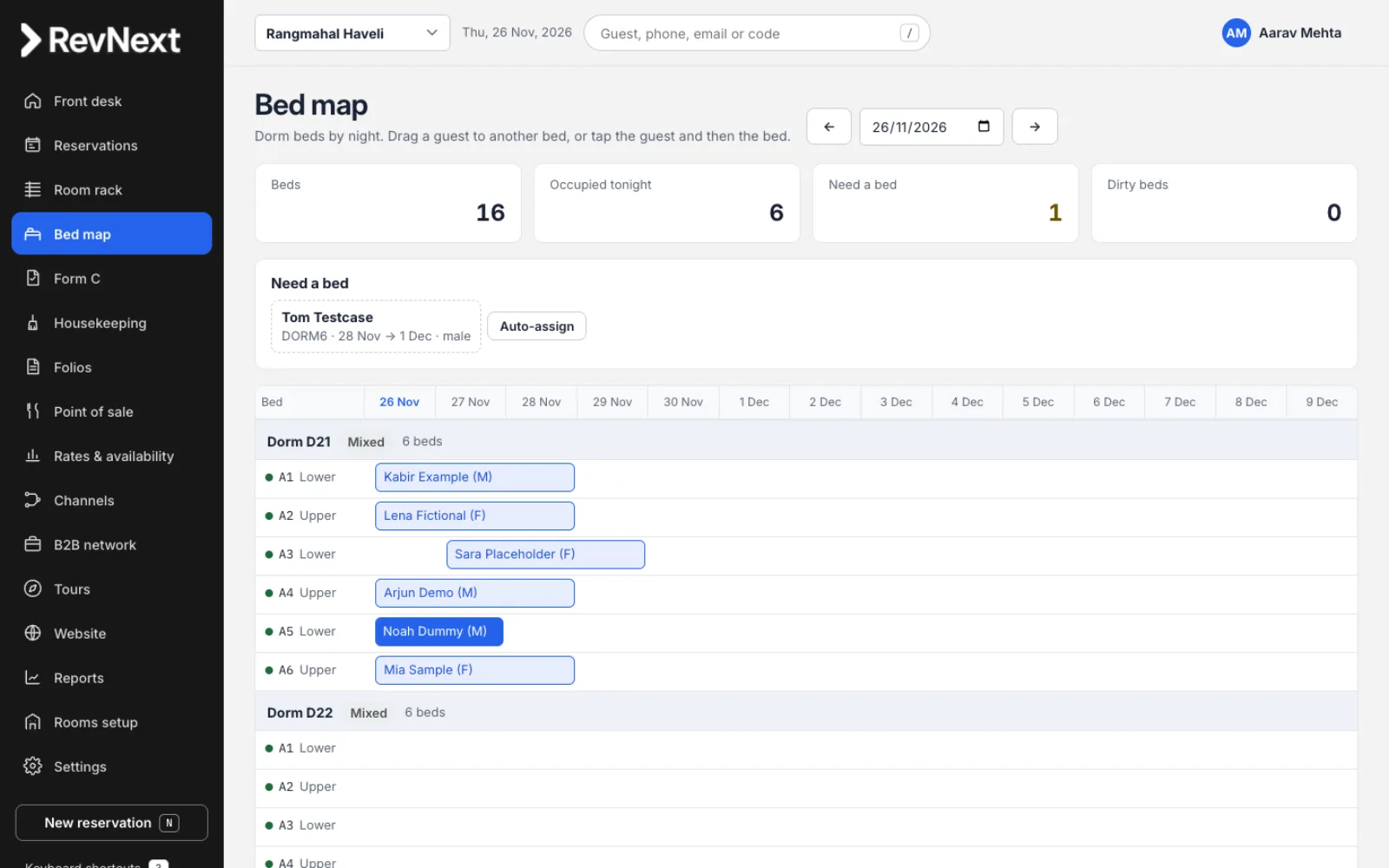
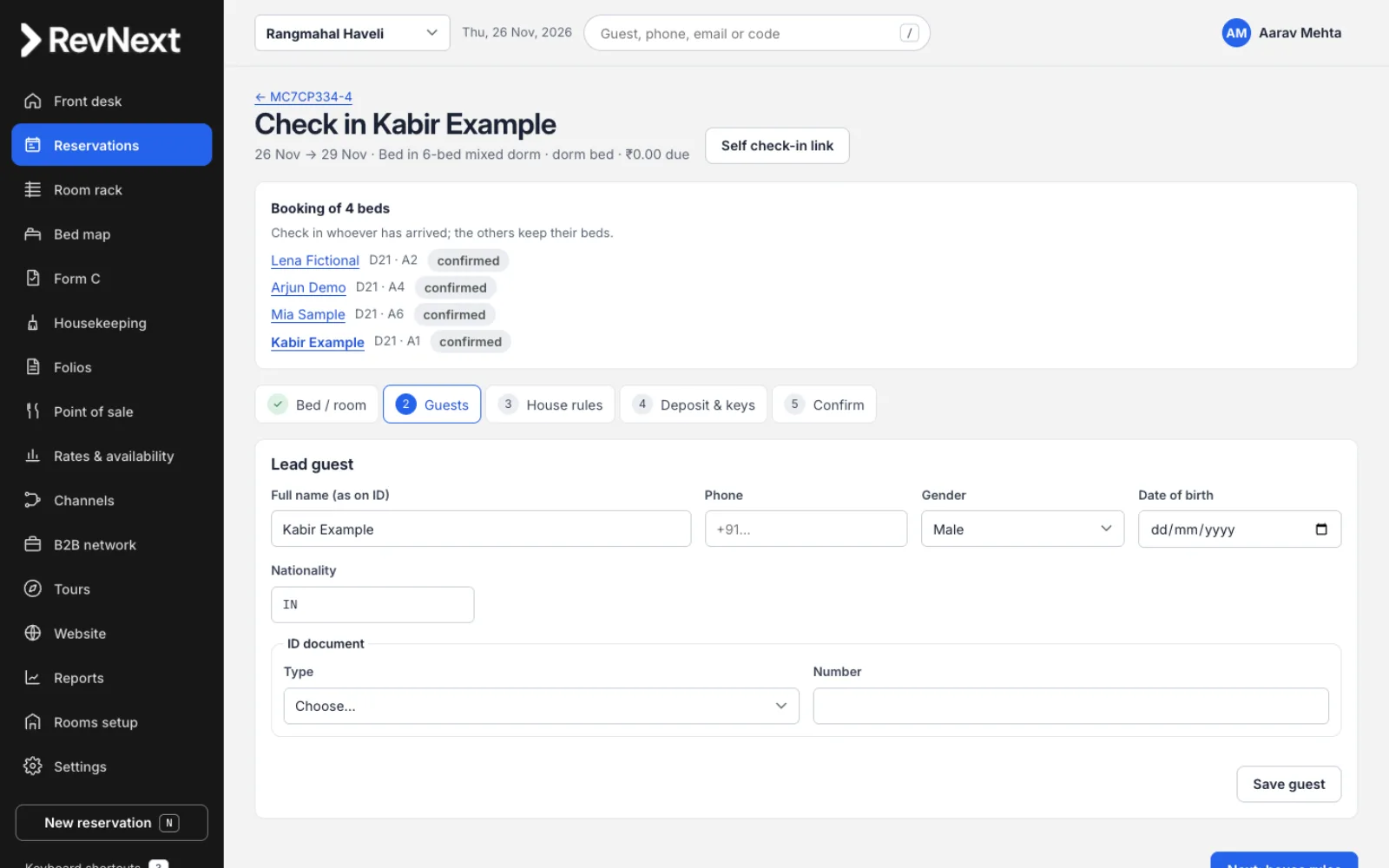
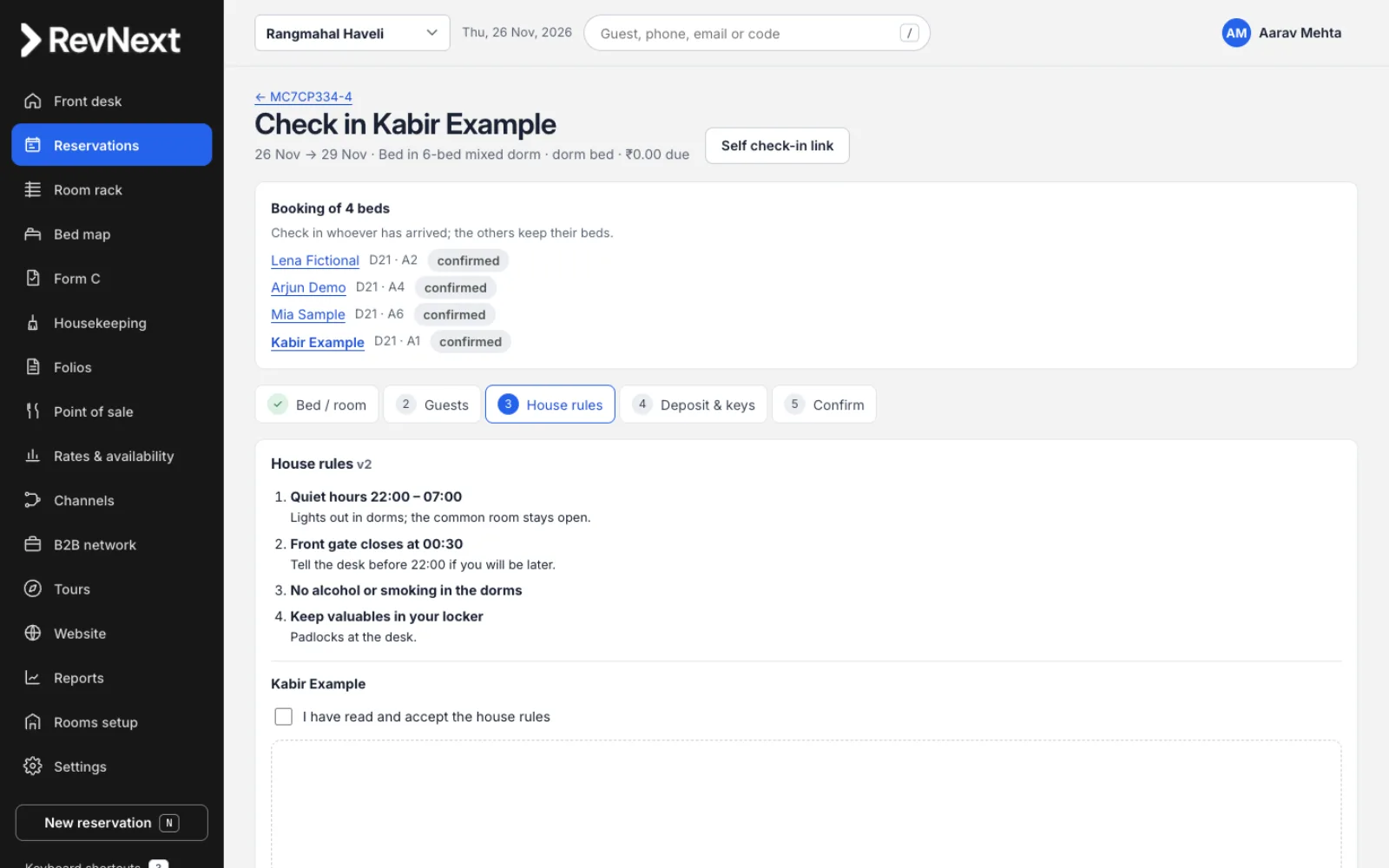
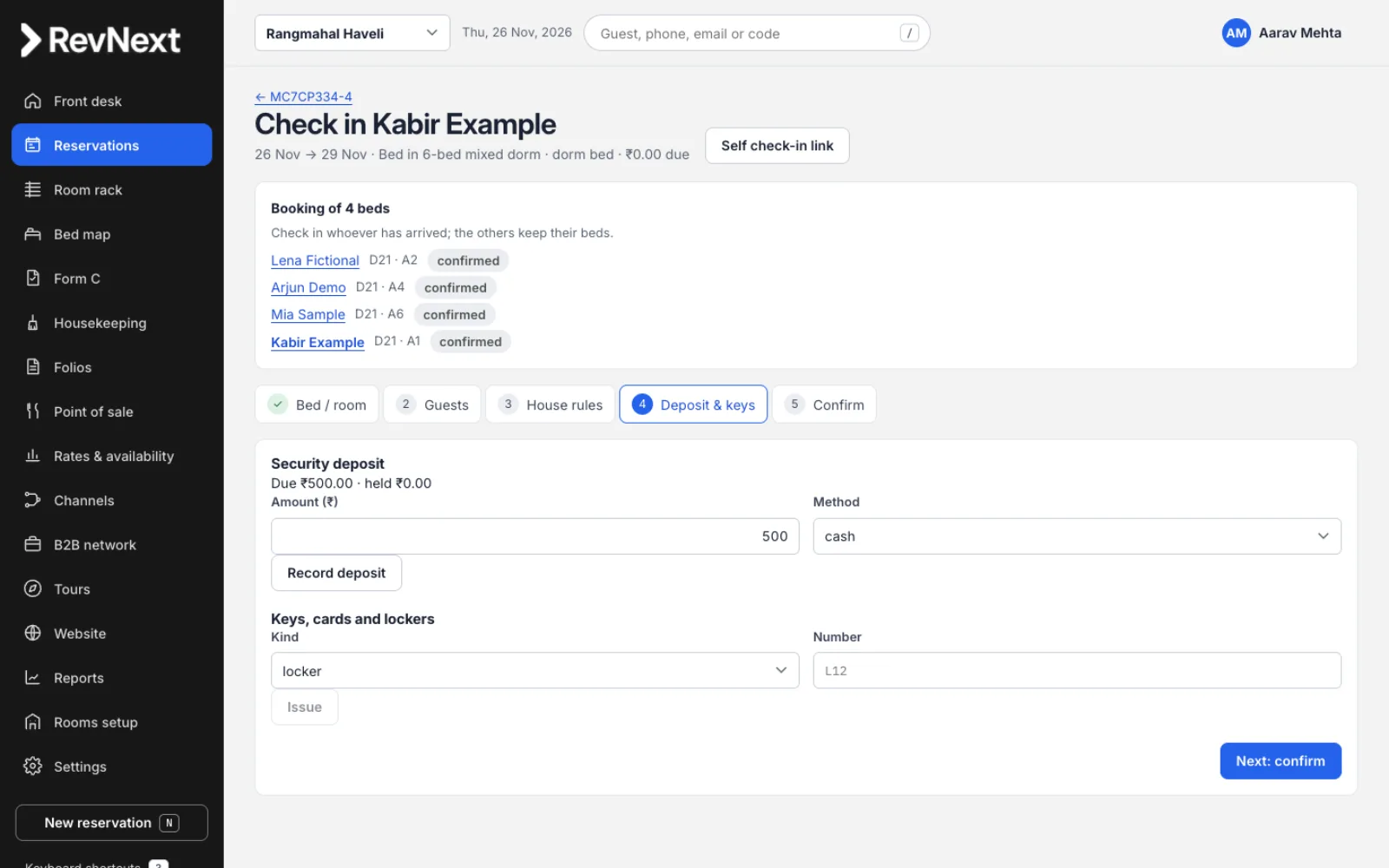
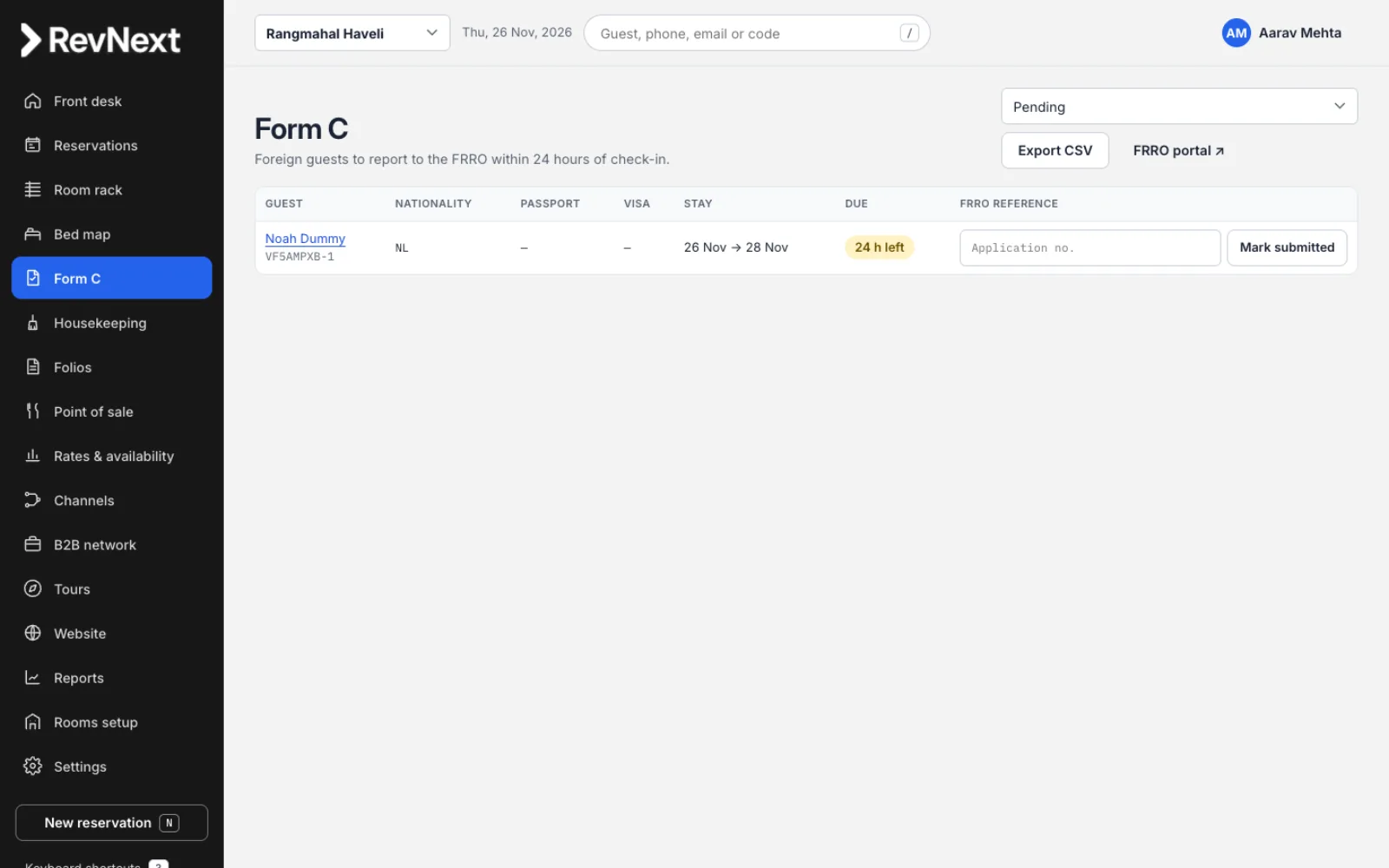
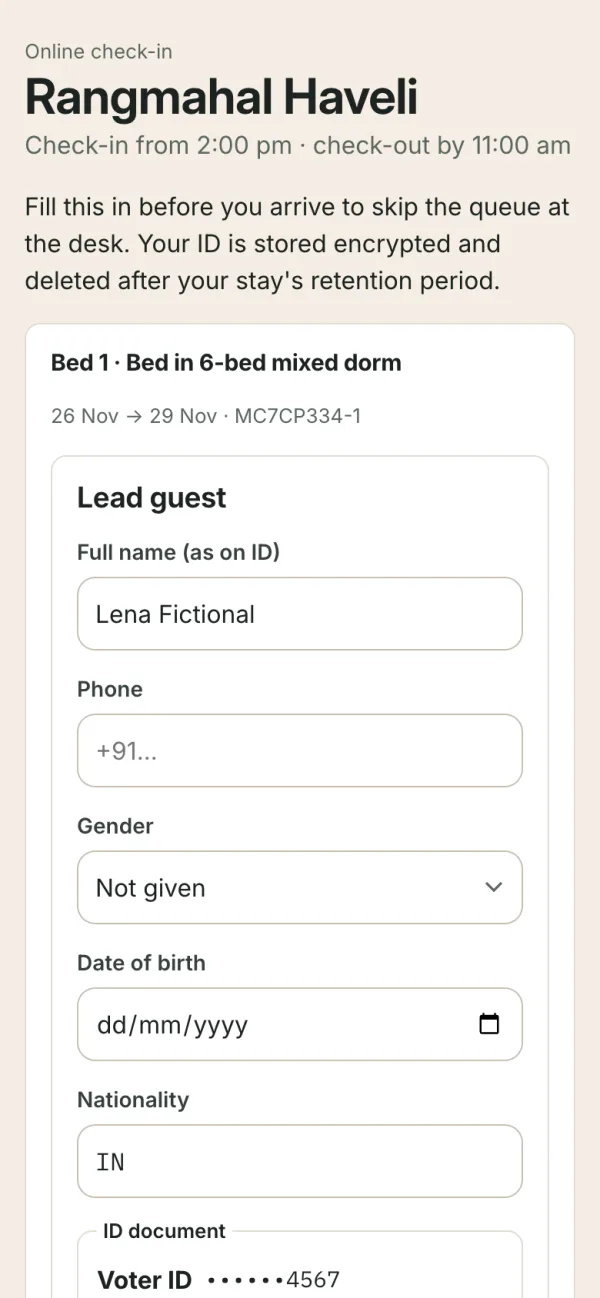
Screens from RevNext's demo property. Every guest name and ID on them is made up.
What it does
What RevNext does for a hostel
Everything on this list is in Cloud PMS. Choose a group to see it.
Beds and dorms
- Sell a dorm by the bed: one bed is one unit of inventory, with its own rate per night
- Or book the whole dorm for a group, only when every bed in it is free
- Beds with labels and positions: single, lower bunk, upper bunk, double or pod
- Locker number, curtain, power socket and window noted per bed
- Female-only, male-only and mixed dorms
- Hotel rooms and dorms under one roof, on one property
Allocation and the bed map
- Auto-allocation that keeps a group in one dorm where it fits
- Guests who ask for a lower bunk get one first
- A female-only dorm takes only female guests; guests with no gender given go to mixed dorms
- Guests who could not be placed are listed with the reason
- Drag a guest to another bed on the bed map, or tap the guest and then the bed
- A bed can never be sold twice for the same night, even if two desks assign at once
Check-in
- A step-by-step check-in: bed, guests, house rules, deposit and keys, confirm
- Every guest's ID: Aadhaar, passport, driving licence or voter ID, with photos of the front and back
- DigiLocker verification, once the property's DigiLocker partner access is set up
- House rules accepted with a signature
- Early check-in: off, free, or with a fee
- Check in part of a group now and the rest when they arrive
- Self check-in by link or QR code before arrival
Foreign guests
- Passport and visa details captured at check-in
- A Form III (formerly Form C) register for each foreign guest, due 24 hours after check-in
- Pending and overdue reports in one list
- CSV export to upload on the government portal, then mark each one submitted with its reference
Deposits, keys and checkout
- Security deposit per booking, per guest or per bed, by cash, UPI or card
- Deposits held outside the bill, so they are not counted as revenue
- Refund, part-refund or keep a deposit at checkout
- Keys, cards and lockers issued and returned
Housekeeping
- Each bed has its own status: dirty, clean or inspected
- A checkout makes a strip-and-make task for that bed
- A linen log for every change: departure, stayover or on request
- Block a single bed out of order for a range of dates
At the desk
A walk-in, from the door to the bed
Step 1
Bed
Find the booking or start a walk-in. Auto-assign a bed or pick one on the bed map.
Step 2
Guests
One card per guest: name, phone, gender, nationality and ID. Passport and visa for foreign guests.
Step 3
House rules
The guest reads your rules, ticks and signs.
Step 4
Deposit & keys
Take the deposit by cash, UPI or card, and hand over the key, card or locker.
Step 5
Confirm
Any early check-in fee is added and the stay starts. Foreign guests go on the Form III list.
Send guests a self check-in link and they can do steps 2 and 3 on their phone before they arrive. The desk then checks the ID, takes the deposit, hands over the key and finishes in one click. The full routine is in how to run hostel check-in.
Who it is for
Built for the way hostels open and grow
Founders opening a first hostel
Set up dorms, beds, house rules, deposits and ID rules once in settings; nothing is hard-coded. Our guide on how to start a hostel in India covers the rest of the launch.
Hostel chains adding locations
Each location is a property under one login, with its own dorms, house rules and check-in settings, and the same guided check-in at every desk.
Hotels and homestays adding dorms
Keep private rooms and add dorms on the same property. Rooms and beds are counted separately, so a dorm is never sold whole while its beds are on sale.
Guest data
ID documents, kept safe and then deleted
Full ID and visa numbers, ID photos and signatures are stored encrypted with AES-256-GCM. Staff screens show the masked number, with Aadhaar as XXXX XXXX 1234. Opening an ID photo needs its own permission and is logged.
Each document is deleted after the retention period you set. The default is 365 days, in line with the rule that guest particulars are kept for at least a year.[2] Your local police may ask for longer; set the period to match.
Price
What Cloud PMS costs
Launch offer: 50% off your first 12 months for new customers who sign up by 15 Feb 2027: ₹1,999.50 a month plus GST, then ₹3,999. Yearly plans get the same discount on the first year.
Launch offer: 50% off your first 12 months. New customers, sign-ups until 15 Feb 2027.Offer terms
Monthly
₹1,999.50a month + GSTregular price ₹3,999
For your first 12 months, then ₹3,999 a month + GST
Billed each month. Cancel any time; it takes effect at the end of the month you have paid for.
Yearly, 2 months free
₹19,995first year + GSTregular price ₹39,990
₹23,594.10 for the first year including 18% GST, then ₹47,188.20 a year
- Billed once a year in advance, and renews each year unless you cancel.
- Cancel any time from Settings → Billing in the app or by emailing billing@revnext.in. It takes effect at the end of the year you have paid for, and you are not billed again.
- 14-day refund on annual plans. Onboarding support included; migration or custom work beyond it is quoted separately.
What it does not do yet
- It does not file Form III for you. You export a CSV and upload it on the government portal.
- DigiLocker verification needs DigiLocker partner access for your property before it can be switched on.
- Hostelworld is not connected. Booking.com is built; Agoda, MakeMyTrip and Goibibo are in sandbox.
- The hostel screens are in the web app, which works on phones; the RevNext mobile app does not have them yet.
Questions
Questions hostel owners ask
What is hostel management software?
Is the hostel version a separate product or price?
Can I sell a dorm per bed and also as a whole room?
How does RevNext keep female and male dorms separate?
How is GST worked out on a dorm bed?
Does RevNext file Form III (Form C) for me?
How are guest ID documents stored?
Which OTAs can sell my dorm beds?
Written by Shaurya Verma, content editor. GST and Form III lines reviewed by Aryan Raj, chartered accountant. Published 26 November 2026, last updated 26 November 2026.
How we checked: every feature on this page is taken from RevNext's product design note for beds and check-in and from the screens built from it. The legal and tax points were read from the sources below on 26 November 2026. This page is general information, not legal or tax advice.
- CBIC. Notification No. 15/2025-Central Tax (Rate), 17 September 2025 (GST on hotel accommodation)
- Ministry of Home Affairs, Gazette of India (G.S.R. 596(E)). Immigration and Foreigners Rules, 2025, rule 17: report by keeper of accommodation
- Bureau of Immigration, Ministry of Home Affairs. Online Form III portal
See RevNext run a hostel
Tell us about your hostel or the one you are planning: how many dorms and beds, and how many locations. We will walk you through the bed map and check-in, and reply within one working day.